Evaluating Model Fit
Evaluate model fit in Alviss AI after training to ensure accurate predictions and reliable insights.
Welcome back to the Alviss AI Getting Started series! After [building your first model](../Getting Started/Building Your First Model.md) and Convergance, the next crucial step is assessing how well the model fits your data. Model fit involves comparing the model's predicted KPIs (e.g., sales or revenue) against the actual data, both in the training period (where the model learns) and the holdout period (unseen data for validation). A good fit ensures reliable insights for attributions, simulations, predictions, and optimizations.
This tutorial covers two main approaches to evaluate fit: reviewing performance metrics for a quick overview and visually inspecting prediction plots for deeper analysis. By mastering these, you'll identify strengths, weaknesses, and potential improvements in your models.
Approach 1: Reviewing Performance Metrics
The simplest way to gauge model fit is through the Performance tab on your model's details page. This tab provides quantitative metrics that summarize prediction accuracy without requiring manual inspection.
-
Navigate to Models in the side menu.
-
Select your model and switch to the Performance tab.
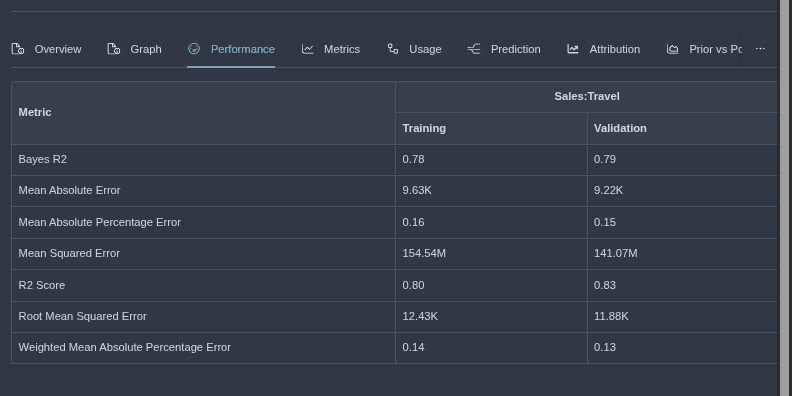
Here, you'll see a series of performance measurements calculated for both training and evaluation (holdout) data:
- R² (Coefficient of Determination): Measures how well the model explains variance (closer to 1 is better).
- Mean Squared Error (MSE): Average squared difference between predicted and actual values (lower is better).
- Root Mean Squared Error (RMSE): Square root of MSE, in the same units as the KPI (lower is better).
- Bayes R²: A Bayesian variant of R² for probabilistic models.
- Mean Absolute Percentage Error (MAPE): Average percentage error (lower is better).
- Mean Absolute Error (MAE): Average absolute difference (lower is better).
- Weighted Mean Absolute Percentage Error (WMAPE): Weighted version of MAPE for imbalanced data.
The most commonly referenced metrics are R², Bayes R², and MAPE because they are scale-independent—unaffected by the magnitude of your KPI. Aim for R² and Bayes R² close to 1 (indicating strong explanatory power) and MAPE close to 0 (indicating low relative error).
Compare metrics between training and evaluation data. Similar values suggest good generalization; large gaps may indicate overfitting (great on training, poor on holdout) or underfitting (poor overall).
These metrics offer a quick benchmark for comparing models—e.g., testing iterations with different variable groups. However, they don't reveal why the fit is good or bad; for that, turn to visual inspection.
Approach 2: Inspecting Fit (Prediction) vs. Actual Data
For a more nuanced evaluation, examine the Fit (prediction) vs actual data plot in the model's details page (often under the Performance or Metrics tab). This visual comparison requires some experience but uncovers actionable insights that metrics alone miss.
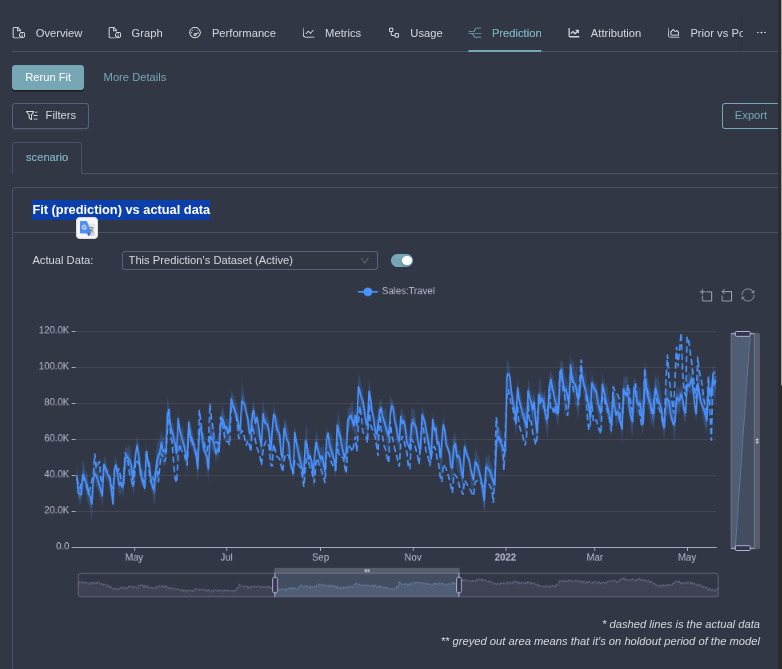
Key questions to ask while reviewing the plot:
- How well does it predict overall? Look for close alignment between the predicted line (model output) and actual data points. Tight overlap indicates a strong fit.
- Are there any outliers the model fails to capture? Identify spikes or dips in actual data not mirrored in predictions. These could stem from real-world events (e.g., promotions or disruptions) needing investigation.
- Are there systematic issues? Check for patterns like consistent under-prediction in certain periods (e.g., holidays) or over-prediction in low-activity times, suggesting model limitations.
Toggle between training and holdout views to ensure the fit holds across both. Use filtering to zoom in on specific combinations (e.g., by country or product).
Using Insights to Improve Your Model
Performance metrics provide a fast way to rank models, but studying the fit plot enables targeted enhancements:
- Handling Outliers: If the model misses anomalies, revisit your raw data in the Activities dashboard. Explain them by adding flexibility—e.g., include Events variables or refine groupings.
- Addressing Poor Fit Areas: If predictions lag in specific segments, consider expanding inputs. A basic model with only seasonality and Media might underperform; try adding Distribution, Brand, or Macro variables for better capture without sacrificing business sanity.
- Iterate Efficiently: Use Actions > Modify Model (High Level) for quick tweaks by opening the model in the Advanced Model Builder.
A "perfect" fit (e.g., R² = 1) on training data might signal overfitting—always validate on holdout. Balance fit with interpretability for real-world applications like marketing optimization.
Best Practices for Model Fit Evaluation
- Start with metrics for a high-level check, then dive into plots for diagnostics.
- Document findings in model notes for team collaboration.
- Benchmark against baselines (e.g., simple trend models) to quantify improvements.
- Re-evaluate fit after dataset extensions or refits to ensure ongoing quality.
A well-fitted model unlocks Alviss AI's full potential, delivering accurate attributions and forecasts. This completes the model fit tutorial. Next in the series: Running Your First Attributions. For deeper dives, explore the Models. Keep refining!