Business Sanity
Assess business sanity in Alviss AI after model fit to ensure outputs are realistic and actionable.
After evaluating model fit, it's critical to assess business sanity—the practical, real-world plausibility of your model's outputs. In Marketing Mix Modeling (MMM), even a model with exceptional fit (e.g., high R² or low MAPE) can be unreliable if it lacks business sanity. This often arises because key business drivers might be missing from the data, leading to unrealistic attributions or predictions. Prioritizing business sanity ensures your insights align with domain knowledge and support actionable decisions.
This tutorial explains what business sanity entails, how to inspect it using attributions, and steps to refine your model for better realism. By the end, you'll be equipped to validate models beyond mere statistical fit, enhancing their value for simulations, predictions, and optimizations.
What is Business Sanity?
Business sanity refers to the logical consistency of model outputs with business expectations and industry norms. It goes beyond metrics like R² by questioning whether the results "make sense" in context. Key aspects to check include:
- ROI Scale for Marketing: Is the return on investment (ROI) for marketing activities realistic? For example, an ROI of 50x might be implausible for most channels.
- ROI Spread Across Channels: Does the distribution of ROI among media channels (e.g., TV vs. digital) reflect expected variations, without extreme outliers?
- Variable Impact Signs: Do variables affect KPIs in the expected direction? For instance, increased marketing spend should generally boost sales (positive effect), not reduce them.
- Importance of Variable Groups: Is the relative contribution of groups appropriate? Weather might influence seasonal products, but it shouldn't explain over 30% of sales variance in non-weather-sensitive industries.
These criteria vary by business, product, or market. What's reasonable for high-margin tech products might not apply to low-margin retail. Understanding your specific context—through stakeholder input or historical benchmarks—is essential for effective evaluation.
Inspecting Business Sanity with Attributions
The most effective way to check business sanity is via the Attribution tab on your model's details page. Attributions quantify the impact of variables on KPIs, using the same data the model was trained on. In most cases, an attribution is automatically generated; if not, create one by navigating to the tab and following the prompts (see Attributions for details).
- Go to Models in the side menu.
- Select your model and switch to the Attribution tab.
Focus on variable-specific sub-tabs (e.g., Media, Distribution) for targeted analysis. For example, to validate media learnings:
-
Navigate to the Media sub-tab.
-
Examine the Attribution of Effects plot.
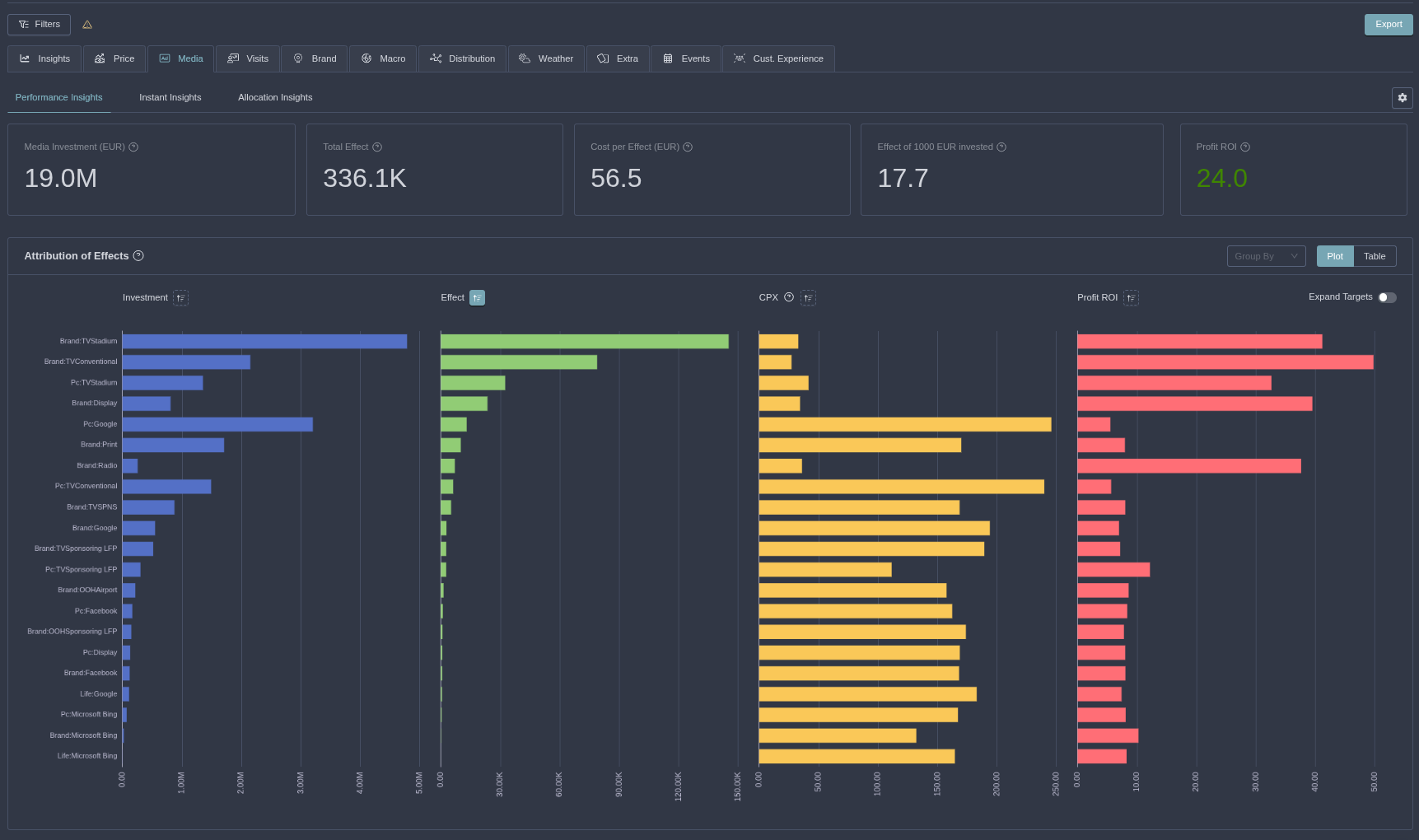
This visualization breaks down media channels, showing:
- Investment: Total spend per channel.
- Effect: Attributed impact on the KPI (e.g., incremental sales).
- Cost per Effect: Efficiency metric (lower is better for cost-effectiveness).
- ROI: Return per unit invested (e.g., revenue generated per dollar spent).
Interpret these to spot issues. In the example above, the total media ROI is 24x, with one channel nearing 50x—this might be unrealistically high for many businesses, signaling a need for adjustment.
Use filtering to drill down by time periods, regions, or products for more granular sanity checks.
Repeat this process for other variable groups (e.g., Brand, Competitor Media) to ensure holistic sanity. Compare against business benchmarks—e.g., if historical ROI averages 5-10x, deviations warrant scrutiny.
Refining the Model for Better Sanity
If business sanity issues arise, refine the model without starting over. Common fixes include adjusting priors to enforce realistic behaviors.
- On the model details page, select Actions > Modify Model (High Level).
- Use a node like the SimulationEffect node to impose stronger priors on key metrics.
- For the high ROI example, set a prior constraining media ROI to a more plausible range (e.g., 5-15x).
- Submit the changes—the platform will refit the model incorporating these constraints.
- Inspect the Attribution tab for the new model to verify improvements.
Apply similar refinements for other issues:
- Wrong Sign: Enforce positive/negative influences via variable group settings.
- Over-Attributed Groups: Adjust effect priors to redistribute importance (e.g., cap weather at 10%).
- Missing Drivers: If sanity reveals gaps (e.g., unexplained variance), extend your Dataset with additional files like Distribution or Brand, then refit.
Over-constraining can harm fit—balance sanity with statistical performance.
Best Practices for Business Sanity
- Involve stakeholders early: Share attribution plots in team settings for collaborative validation.
- Benchmark iteratively: Compare sanity across model versions using notes or the Projects structure.
- Document thresholds: Define acceptable ranges (e.g., ROI 3-20x) per project for consistency.
- Combine with fit: Always check sanity after confirming convergance and evaluating model fit.
Ensuring business sanity transforms your models from statistically sound to practically useful, driving confident decisions in marketing and beyond. This completes the business sanity tutorial. Next in the series: Running Simulations and Predictions. For more, explore Attributions. Keep validating!